What an AI Agent Is — and How It Differs From a Chatbot
This is the opening chapter of Hiring Your First AI Employee. The full 10-chapter book is available as PDF + online edition.
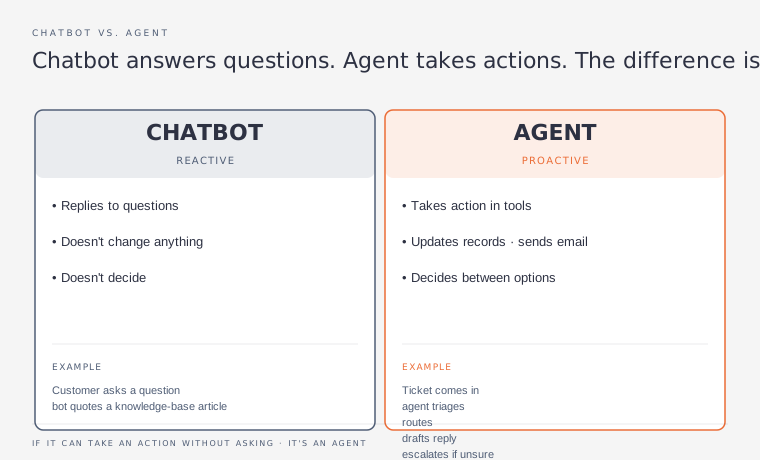
When most people hear ‘AI’, they think of a chatbot — a tool you ask a question and it answers. Useful, but passive. You initiate every interaction. You decide when to use it. It waits for you.
An AI agent is different. An agent takes initiative. It monitors for triggers, makes decisions based on rules you’ve defined, executes tasks, and reports back — all without you being involved in each step. It’s the difference between an assistant who answers questions when asked and an employee who takes ownership of a process and runs it.
The distinction is autonomy. A chatbot responds. An agent acts.
| A practical example A chatbot: you paste a customer complaint into Claude and ask for a response draft. An agent: a customer sends a complaint, the agent reads it, categorises it by type and urgency, drafts a personalised response, sends it if confidence is high, or flags it for your review if confidence is low — all while you’re in a client meeting. |
|---|
What Makes an AI Agent
An AI agent has four components working together:
| Component | What It Does | Example |
|---|---|---|
| Trigger | What starts the agent working | New email arrives, form submitted, scheduled time, new file in folder |
| Intelligence | The AI model that reads, reasons, and drafts | Claude, ChatGPT, or Gemini via API |
| Action | What the agent does with the output | Send email, update database, post to Slack, create document, file ticket |
| Escalation | When the agent stops and asks for human input | Confidence below threshold, unusual situation, high-stakes decision |
Building an agent means connecting these four components. For most entrepreneurs, this means: a trigger in your automation tool (Make or Zapier), an AI model call via API or built-in integration, an action back into your business tools, and a human review step for exceptions.
| You don’t need to write code All three agents in this guide can be built using Make or Zapier with their built-in AI integrations. No coding, no API keys (unless you want more control), no developer required. If you’re comfortable building the automations from the Business Automation Guide, you can build these agents. |
|---|